Mining Two Hours From Home: Giving Someone Else the Alert
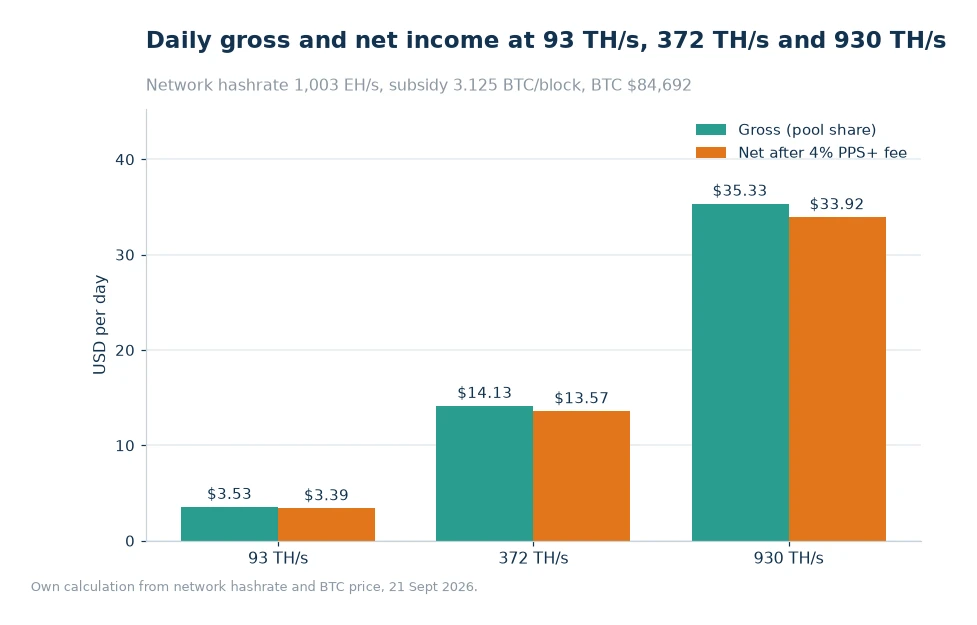
The rig sits in a parent's spare room, two hours of driving away, and the person who can actually hear it is not the person who owns it. At 93 TH/s the machine credits $3.39 a day after the listed 4%, which is $101.70 a month — enough to matter, not enough to justify a weekly drive. The handover has to be built so that a real problem produces a phone call rather than a silent week.

Key takeaways
- 93 TH/s nets $3.39 a day, so a silent week costs about $23.73 before it is noticed.
- Share the monitoring view, never the withdrawal credentials, with the person on site.
- A daily ninety-second check catches more faults than a weekly deep dive.
- 930 TH/s at the same site would justify remote hands and a service contract instead.
The handover starts with a shared view, not a shared wallet
Two people need to see the machine; only one needs to move the coins. That split is the design principle. The person on site needs live hashrate, temperature if the hardware reports it, and a way to tell whether a drop is local or pool-wide. The owner needs the payout address, the balance and the withdrawal history.
Mixing the two creates risk without adding much convenience. A relative with full account access can withdraw by accident, and an owner who shares a password to save a phone call has widened the blast radius of any mistake. Read-only visibility is enough for the job most of the time.
The practical setup is a second login or a shared monitoring view, plus a phone that is charged and within reach. That sounds trivial until the first outage happens at 3 a.m. and the on-site contact is asleep with the phone in another room.
What a phone notification can and cannot tell you
A hashrate alert can tell you that the machine stopped submitting shares. It cannot tell you whether the cause was the router, the power supply, the fan or the neighbour's electrician. That distinction is the difference between a phone call and a drive, and it is learned by checking two things in order.
First, the pool state: if the whole pool shows a dip, the machine is probably fine and the alert is noise. Second, the local network: if the router is up but the miner is not responding, the fault is in the room. Those two checks take under a minute and eliminate most false alarms.
The ViaBTC App Download page covers the iOS and Android builds, and the app is the simplest way to put the hashrate series in a pocket. Set the alert threshold once and test it by unplugging the machine for ten minutes; an alert that has never fired is an assumption, not a safeguard.
A daily check that takes ninety seconds
Open the app, confirm the hashrate is within ten percent of the usual figure, confirm the daily credit landed and look at the last twenty-four hours for gaps. That is the whole routine. It is short enough to do while the kettle boils, which is the only reason it will be done every day.
The on-site contact needs a shorter version: is the fan running, is the light on, is the room unusually hot. Three yes-or-no questions that any adult can answer without knowing what a share is. Write them on a card and tape it to the shelf.
Once a week, add one more step: compare the pool's reported hashrate with the miner's own dashboard. A persistent gap between the two is the earliest sign of a network problem or a failing board, and it is invisible if only one screen is ever checked.
Write the routine down for the person on site, including what a normal morning looks like. "Hashrate around the usual figure, credit landed, no gaps" is a complete sentence and it gives them a baseline to compare against. A baseline is what turns a vague worry into a specific question, and a specific question is what gets answered quickly over the phone.
When to drive out instead of tapping refresh
Drive when the machine is offline and the router is online. Do not drive for a hashrate dip that the pool state explains, and do not drive for a single missed credit that arrives an hour later. The rule of thumb is simple: a local fault that survives one remote reboot and one hour of waiting is worth the trip.
The 93 TH/s site is small enough that a wasted drive costs more than a day of output. That asymmetry should shape the rules. At 930 TH/s the same trip is trivial by comparison, and the case for paid remote hands or a hosting arrangement becomes much stronger.
Keep a small spares box at the site: one fan, one power cable, one network cable. Most call-outs end with one of those three, and having them within reach turns a two-hour drive into a five-minute swap by the person who is already there.
| Window | 93 TH/s | 372 TH/s | 930 TH/s |
|---|---|---|---|
| 1 day | $3.39 | $13.57 | $33.92 |
| 7 days | $23.73 | $94.99 | $237.44 |
| 30 days | $101.70 | $407.10 | $1,017.60 |
Worked example
Put a price on the silence at 93 TH/s, then see what a week of it would cost.
- The daily rate per terahash works out as 450 ÷ 1,003,000,000 = 0.00000044865 BTC.
- At 93 TH/s: 93 × 0.00000044865 = 0.00004172 BTC a day.
- At $84,692: 0.00004172 × 84,692 = $3.533 gross.
- After the listed 4%: 3.533 × 0.96 = $3.392, or $3.39 net.
- Seven days of downtime: 3.392 × 7 = $23.74, shown as $23.73 at the rounded rate.
- Thirty days: 3.392 × 30 = $101.76, or $101.70 at the rounded rate.
- Hourly credit: 3.392 ÷ 24 = $0.1413, which is what a ninety-minute outage costs — about 21 cents.
That last line is the useful one for setting alert thresholds. A machine that stops for an hour is a nuisance, not a crisis. One that stops for a day and is not noticed is the failure mode worth designing against, and it is exactly what a tested notification prevents.
Frequently asked questions
What monitoring access should the person on site have?
Enough to see live hashrate, worker status and recent gaps, and no ability to move funds. A shared monitoring view plus a phone alert covers the job; withdrawal credentials stay with the owner.
How much does a week of unnoticed downtime cost at 93 TH/s?
About $23.73 at $84,692 per BTC, since the machine nets $3.39 a day after the listed 4%. That is the number to weigh against the cost of a remote monitoring setup or a spare fan.
Should I drive out for every hashrate drop?
No. Check the pool state and the local router first, then allow one remote reboot and an hour of waiting. A fault that survives all three is worth the trip; most drops do not survive the first check.
Leave the paper checklist on the shelf
Print the three on-site questions and the two remote checks, and tape them beside the machine. The person who finds them at 7 a.m. should not need to call anyone to know what to do first. The pool state page is the first remote check; the wallet is where the owner confirms the credits after a quiet night.
Distance is manageable when the information is shared and the credentials are not. The machine can run for months without anyone standing next to it, provided somebody is told when it stops.
Sources: the ViaBTC download, pool state and wallet pages for app builds, live pool data and account structure[1]. The 21 Sept 2026 reading gives 1,003 EH/s hashrate, 132.76 T difficulty and $84,692 per BTC. Published 24 Oct 2026.